Comparative browsing
The Browser compares two genomes with a genome alignment track (track type genomealign). The
genome you are viewing is the reference genome; the alignment track links each region of it to the
matching (syntenic) region of a second, query genome. Once an alignment track is displayed, tracks
of the query genome, such as its genes or your own data mapped to it, can be shown under the
reference genome, placed through the alignment.
The examples on this page use human hg38 as the reference genome and mouse mm10 as the query genome,
at the human SPP2 gene (chr2:234040000-234080000).
Add a genome alignment track
The alignment tracks available for a genome are among its annotation tracks.
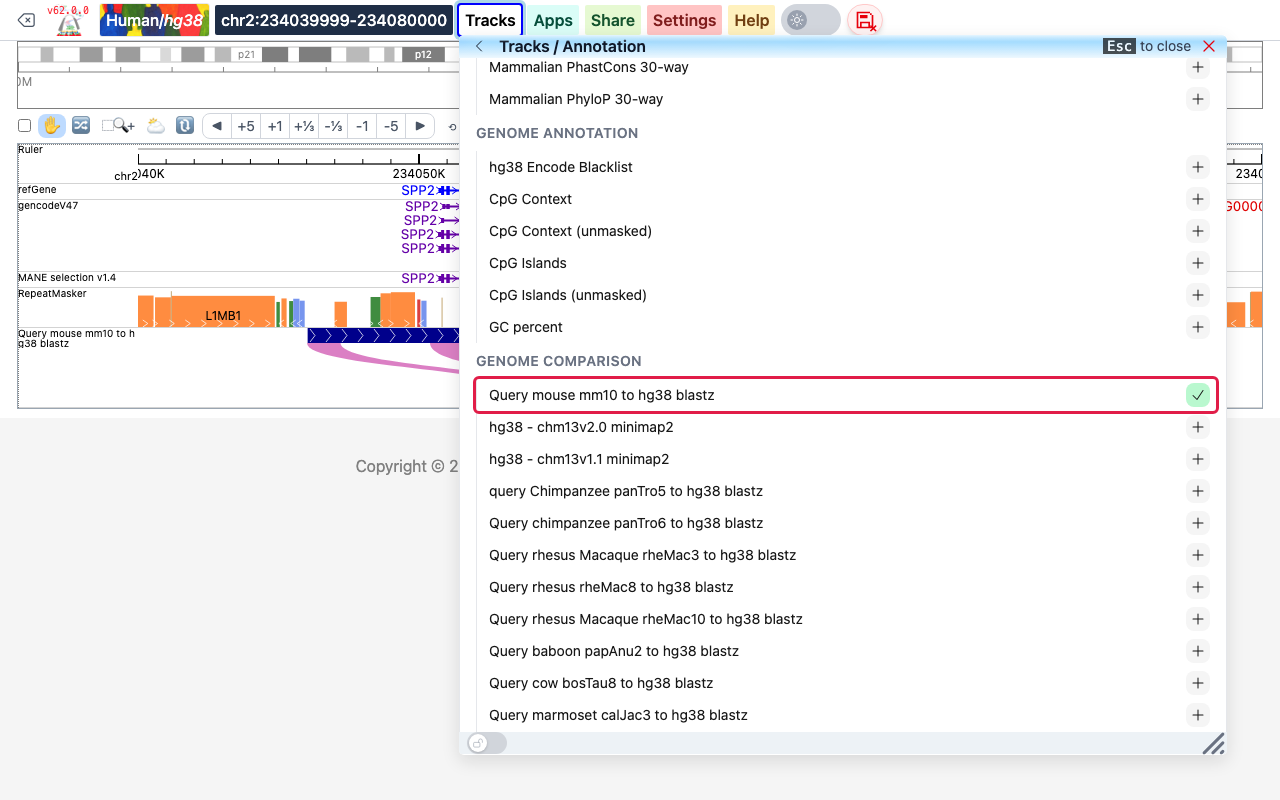
- Click Tracks, then Annotation Tracks.
- Click the name of the genome (here hg38) to open its list of tracks, and scroll to the Genome Comparison group. Each entry aligns one other genome to the reference genome, for example Query mouse mm10 to hg38 blastz.
- Click + at the right of the alignment you want. The button turns into a check mark and the track is added to the view.
An alignment file of your own (see Genome alignment file format)
can be added with Tracks > Remote Tracks > Add Tracks: choose the track type
genomealign — genome pairwise alignment, give the file URL, and type the name of the other
genome (for example mm10) in Query Genome. In a datahub, give the
alignment file in url and the other genome in querygenome, see
Datahub definition.
Read the alignment
The alignment track has two display modes, chosen automatically from the zoom level.
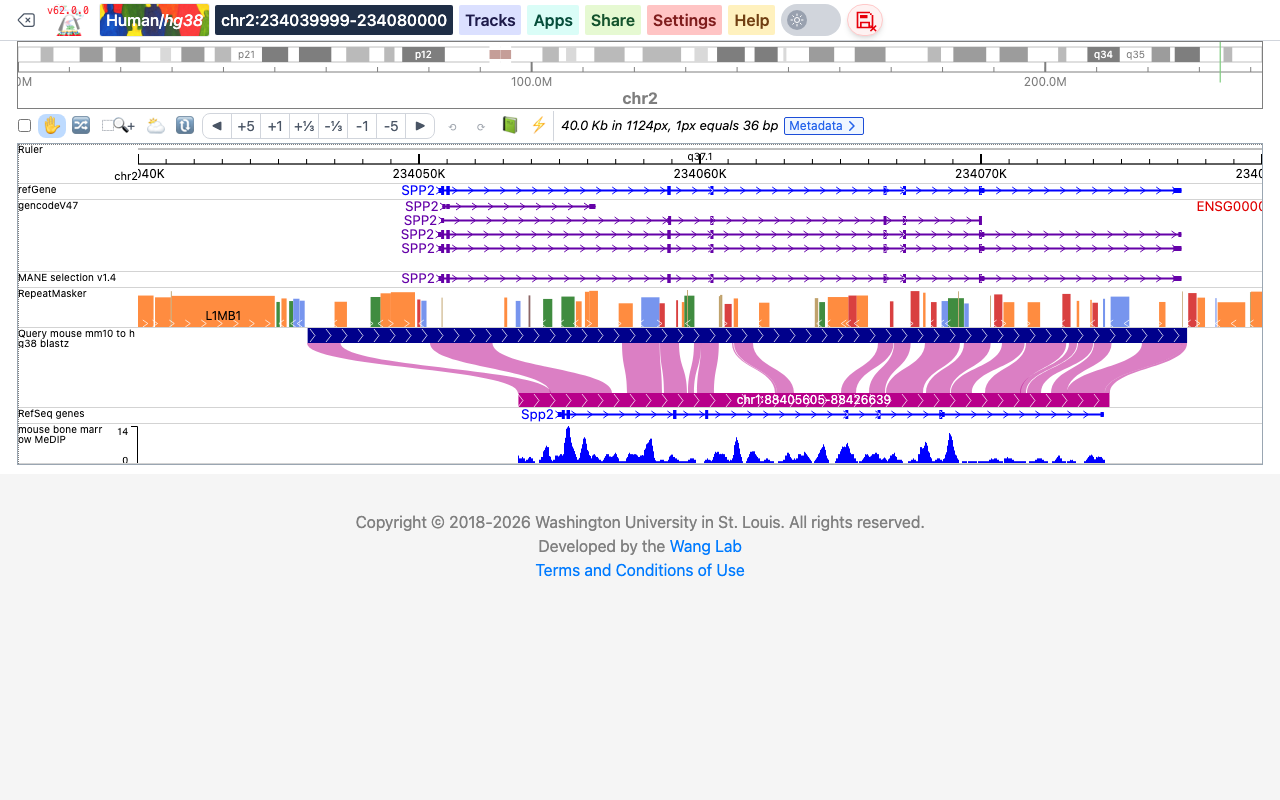
Rough view. When more than about 10 bases fit in one pixel, the top bar (dark blue) shows the
aligned part of the reference genome and the bottom bar (magenta) the matching region of the query
genome, labeled with its coordinates (here chr1:88405605-88426639 on mm10). Ribbons connect the
aligned blocks of the two genomes, so you can see how the region is conserved, rearranged or
inverted. The tracks of mm10 below the alignment are explained in the next section.
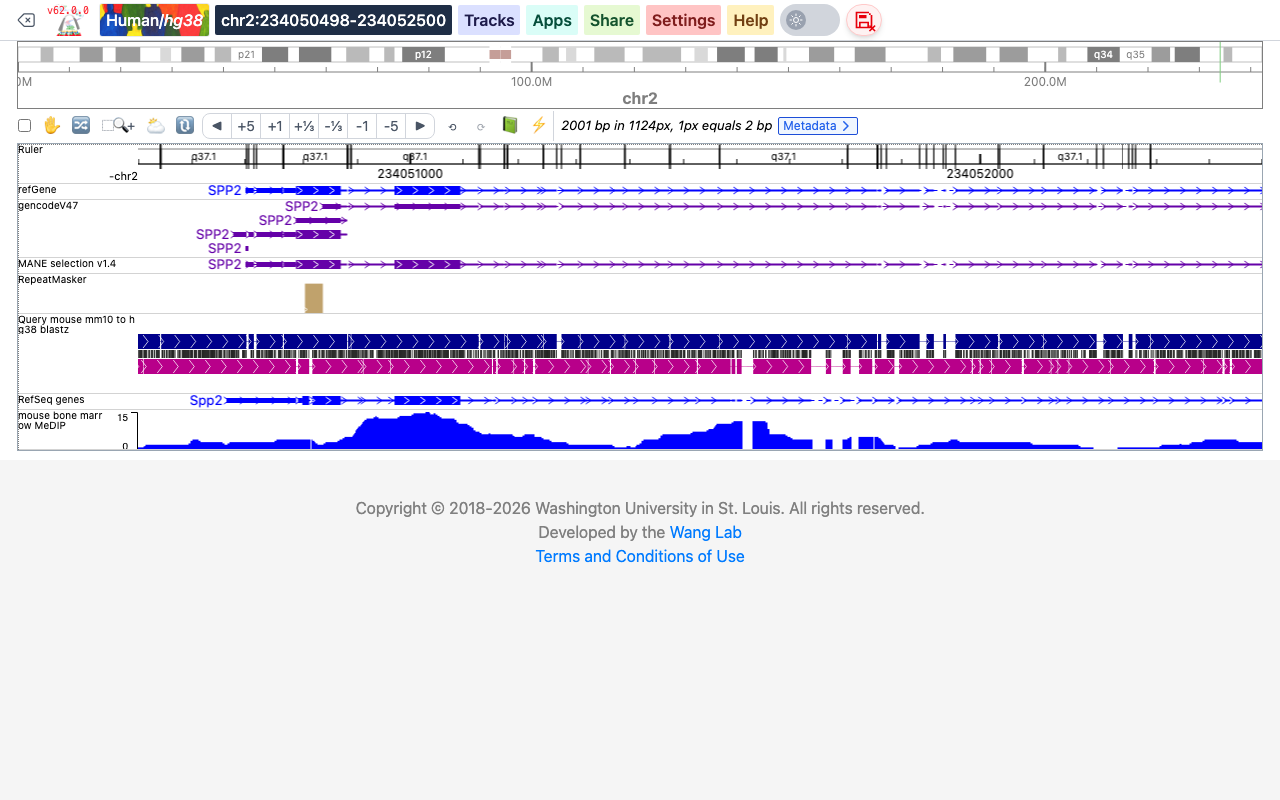
Fine view. When you zoom in to less than about 10 bases per pixel, the track shows the aligned sequences of the two genomes one above the other: the reference genome on top, the query genome at the bottom, and between them a tick for each base that is identical in both. Gaps in either row are insertions or deletions. Point at the track to see the sequences around the mouse position.
The colors of the two genomes and the height of the track can be changed in the menu that opens when you right-click the track (Height, Primary genome color, Query genome color, Background color).
Show tracks of the query genome
Tracks of the query genome are drawn under the reference genome, through the alignment: each piece of query-genome data is placed under the reference region it is aligned to, so the two genomes can be compared directly. In the screenshots above, RefSeq genes shows the mouse Spp2 gene and the mouse bigWig track sits under the human SPP2 gene.
Annotation tracks of the query genome
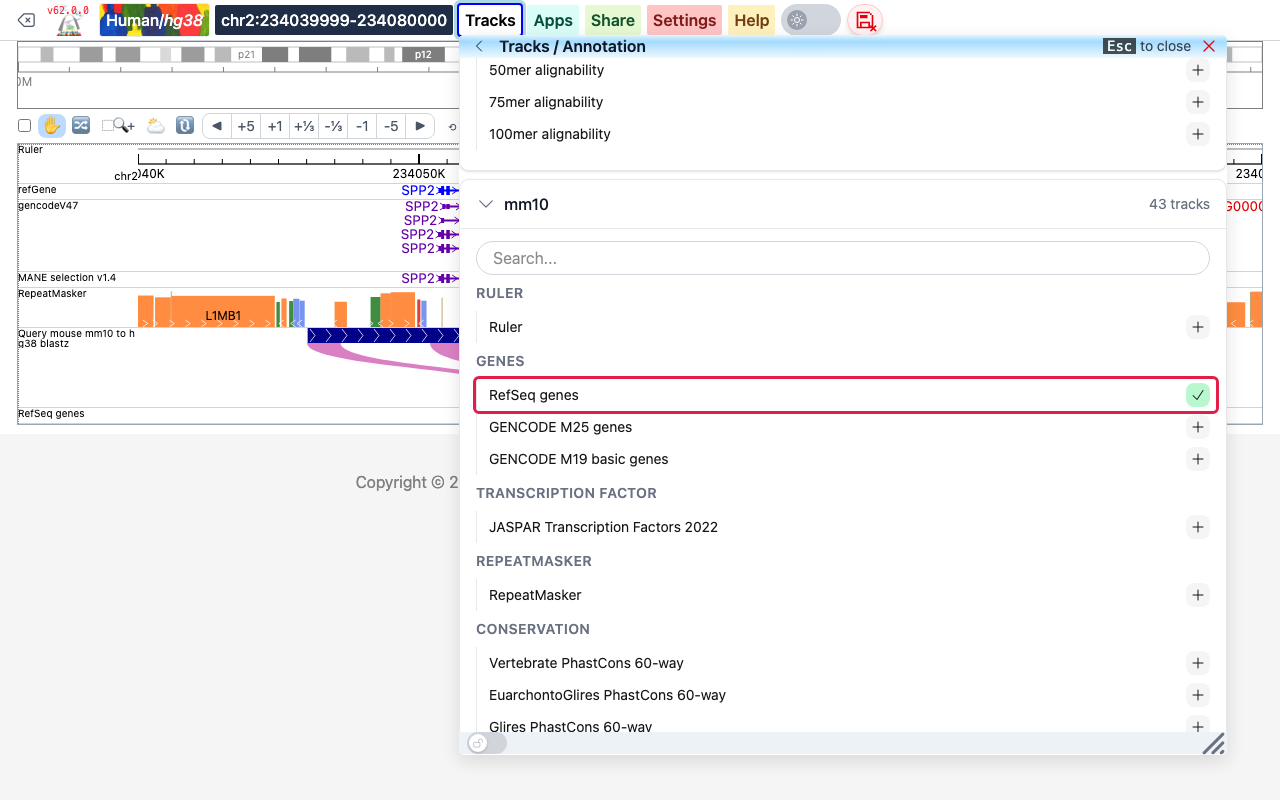
Once an alignment track is displayed, Tracks > Annotation Tracks also lists the query genome (here mm10) below the reference genome. Click its name and click + next to a track to add it, for example RefSeq genes in the Genes group.
Your own data on the query genome
In Tracks > Remote Tracks > Add Tracks, the Assembly list offers the query genome of each displayed alignment track as well as the reference genome. Choose the genome your file is mapped to, here mm10, then click Add Track. Tracks > Local Tracks has the same Assembly choice for files on your computer.
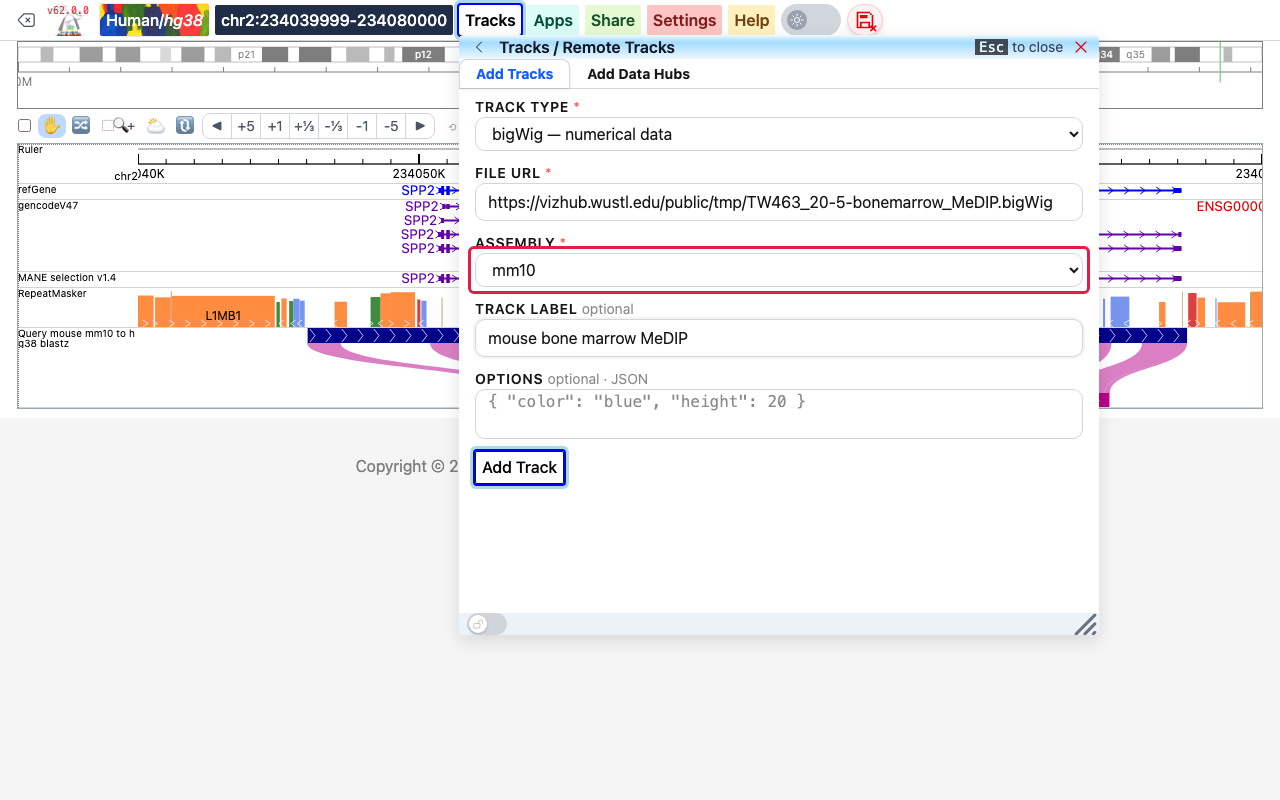
In a datahub, mark a track of the query genome with a genome metadata
term. This hub shows the alignment of the screenshots above, the mm10 RefSeq genes and an mm10
bigWig track, when loaded on hg38:
[
  {
    "name": "hg38tomm10",
    "label": "Query mouse mm10 to hg38 blastz",
    "querygenome": "mm10",
    "type": "genomealign",
    "url": "https://vizhub.wustl.edu/public/hg38/weaver/hg38_mm10_axt.gz",
    "showOnHubLoad": true
  },
  {
    "type": "geneAnnotation",
    "name": "refGene",
    "label": "RefSeq genes",
    "genome": "mm10",
    "metadata": { "genome": "mm10" },
    "showOnHubLoad": true
  },
  {
    "type": "bigwig",
    "name": "mouse bone marrow MeDIP",
    "url": "https://vizhub.wustl.edu/public/tmp/TW463_20-5-bonemarrow_MeDIP.bigWig",
    "metadata": { "genome": "mm10" },
    "showOnHubLoad": true
  }
]
New tracks are added at the bottom of the view. To group the tracks by genome, move them with the reorder tool of the tool bar; see User interface.
Datahub definition
{
    "name": "hg38tomm10",
    "label": "Query mouse mm10 to hg38 blastz",
    "type": "genomealign",
    "querygenome": "mm10",
    "url": "https://vizhub.wustl.edu/public/hg38/weaver/hg38_mm10_axt.gz"
}
type:genomealign.url: the bgzip-compressed, tabix-indexed alignment file (the index,.gz.tbi, sits next to it; otherwise give its URL inindexUrl).querygenome: required, the name of the other genome as the Browser knows it (mm10,panTro6,t2t-chm13-v2.0…). The track is added to the reference genome, the one being viewed.name,label,showOnHubLoad: as for any track, see Track properties.options:height(default 80),primaryColor(reference genome, defaultdarkblue),queryColor(query genome, default#B8008A) andbackgroundColor.
Genome alignment file format
A genome alignment file is a tab-delimited, BED-like text file describing a pairwise whole-genome alignment. Each line is one aligned block, with four columns: the chromosome, start and end of the block in the reference genome, and the alignment itself:
chr1 start end alignment
The fourth column holds an id number and the alignment details, written as JavaScript-style objects (keys without quotes):
| field | content |
|---|---|
id | a number identifying the block |
genomealign.chr | chromosome of the block in the query genome |
genomealign.start, genomealign.stop | start and end of the block in the query genome |
genomealign.strand | + or -: strand of the query genome |
genomealign.targetseq | aligned sequence of the reference genome, with - for gaps |
genomealign.queryseq | aligned sequence of the query genome, with - for gaps |
targetseq and queryseq have the same length. Two lines of the hg38 to mm10 alignment used on this
page (sequences shortened here):
chr1	11677	11858	id:1,genomealign:{chr:"chr6",start:121530269,stop:121530440,strand:"-",targetseq:"ccctggagattctta-ttagtg…",queryseq:"ctcTAGGGAGTCTTAGTCAAAG…"}
chr1	12176	12259	id:3,genomealign:{chr:"chr17",start:66149262,stop:66149338,strand:"+",targetseq:"GATTGGAGGAAAGATGAGTGAG…",queryseq:"GGTTGGAGGGAAGATGAGTGAA…"}
Make one from an AXT file
The file is derived from an AXT alignment, such
as those made by lastz or blastz. The script axt2align.py from the
eg-react scripts converts it. It
takes the chromosome sizes of the query genome (a tab-delimited file of chromosome names and lengths,
used for blocks on the - strand), the AXT file (plain or .gz) and the name of the output file,
ending in .gz:
python3 axt2align.py mm10.chrom.sizes hg38_mm10.axt.gz hg38_mm10.genomealign.gz
The script sorts its output, compresses it with bgzip and indexes it with tabix -p bed, which
gives hg38_mm10.genomealign.gz and hg38_mm10.genomealign.gz.tbi; put both files in the same
web-accessible directory. If you write the file another way, sort it by the first three columns,
then compress and index it:
sort -k1,1 -k2,2n example.genomealign > example.sorted.genomealign
bgzip example.sorted.genomealign
tabix -p bed example.sorted.genomealign.gz
An alignment can also be made with minimap2 and converted to AXT. This is how the hg38 to
CHM13 alignment was made:
minimap2 -x asm5 --cs=long hg38.fa chm13.fa > hg38-chm13.paf
sort -k6,6 -k8,8n -k9,9n hg38-chm13.paf | perl -ln unique_paf.pl > hg38-chm13.unique.paf
paftools.js view -f maf hg38-chm13.unique.paf > hg38-chm13.maf
maf-convert axt hg38-chm13.maf > hg38-chm13.axt
python3 axtSplit.py 100 hg38-chm13.axt hg38-chm13.split.axt
unique_paf.pl removes redundant segments of the alignment and axtSplit.py splits long alignment
blocks at gaps longer than 100 bp; both are in the same
eg-react scripts folder.